Medical & Dental Practice VoIP Phone System with 24/7 Booking
Cloud VoIP phone service built for medical and dental practices. It books patients while the front desk is checking someone in, sends reminders that cut no-shows, and routes overflow between locations.
Plans from $4.96/mo
No contracts
Free number porting
Call (844) 843-4175 for a free consultation.
What is the best VoIP phone system for a medical or dental practice?
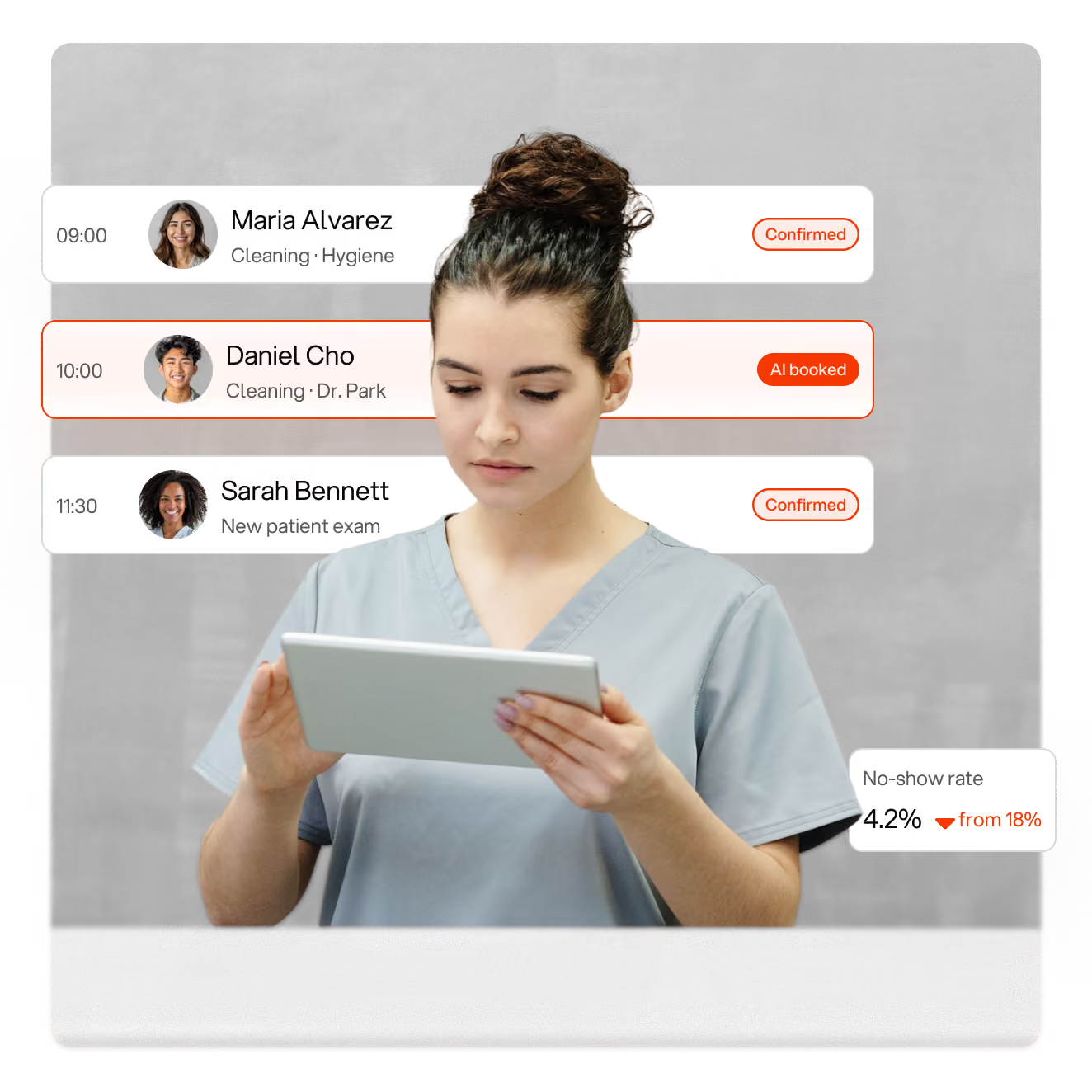
The best healthcare phone system is a cloud VoIP service that answers every new-patient call live, books appointments straight into your schedule, sends automated reminders, and routes overflow between offices. Voiply does that with an AI receptionist, appointment reminders and ring groups from $4.96 per user a month, no contract.
Your front desk can’t be in two places at once
24/7 Patients call when it suits them
$290Average monthly bill on old landlines
1 in 5Visits missed without reminders
Ready to get started? Call (844) 843-4175 to learn more.
Voiply works every step of the patient visit, from first call to recall
From the new-patient call to the recall reminder, every conversation runs on one healthcare phone system.

Answer
Every new-patient call is answered live, even when the front desk is chairside.

Book
Appointments are scheduled and added to your calendar automatically, with insurance noted.

Remind
Automated text and call reminders go out before the visit, and patients confirm or reschedule in a tap.

Recall
Recall reminders bring patients back on schedule, so the hygiene and follow-up columns stay full.
Every call answered even when the front desk is chairside
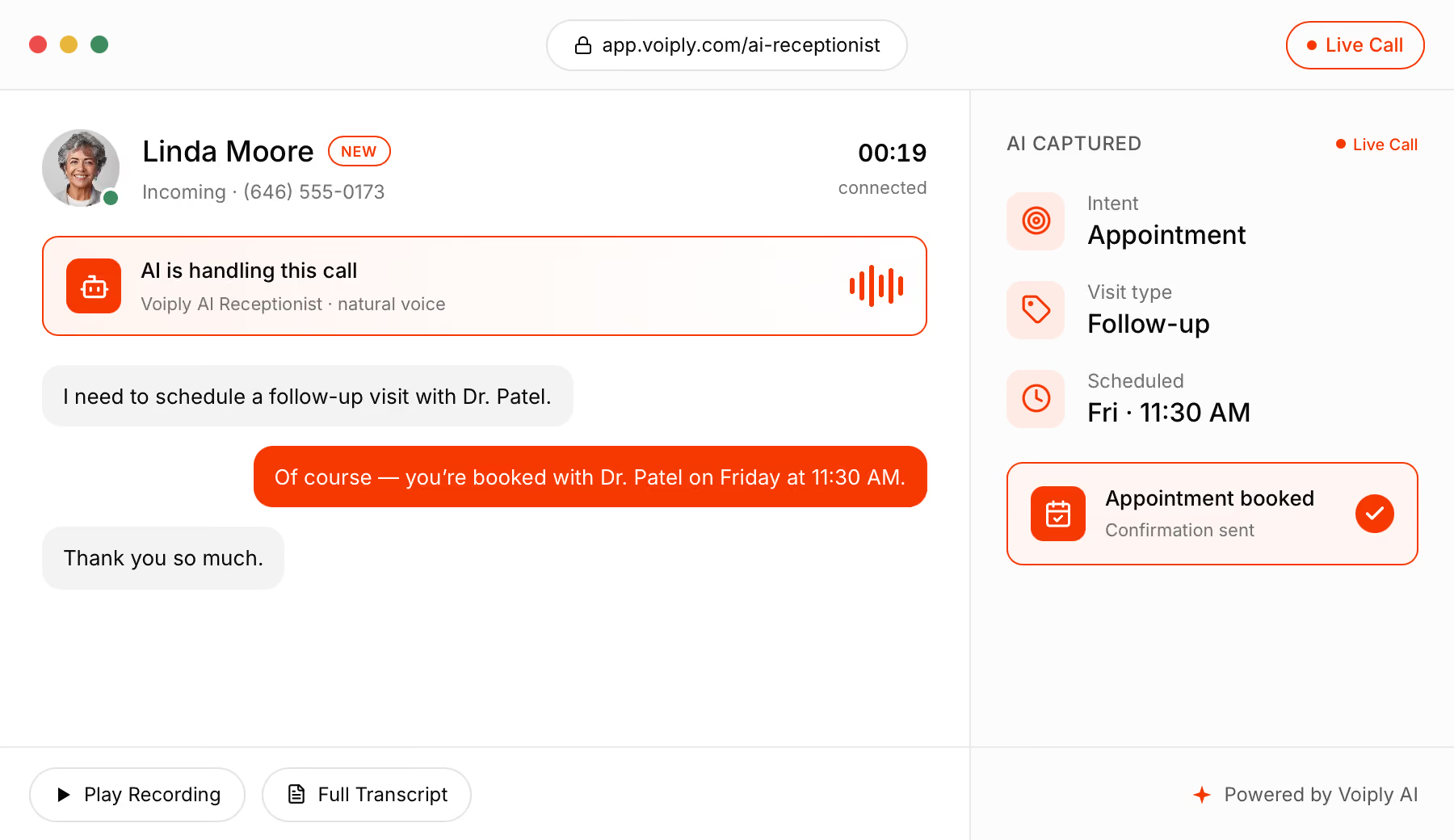
Patients call while you’re with someone or after you close. Your assistant picks up, asks the questions your front desk would, then books the visit or takes a message. Press play on a sample call and watch the notes build as it goes.

Books straight into your practice software
Flags a real emergency for an instant call back
Notes and recording land in the patient’s chart
Talk to an Expert at (844) 843-4175

The right phone setup for every kind of practice
A dental office and a physical therapy clinic don’t get the same calls. Here’s how practices set up Voiply, by specialty and by size.
The calls practices get every day, and how Voiply handles them

Appointment booking
Books the visit with the provider, time and insurance noted, then texts a confirmation.

Reminders and reschedules
Sends automated reminders and lets patients confirm or move the visit in a tap, without phone tag.

Prescription refill requests
Routes to the refill line or takes a message with the pharmacy and medication, so the nurse line isn’t interrupted.

Insurance and billing
Answers which plans you accept and routes billing questions to the right desk.

After-hours calls
Pages the on-call provider for genuine emergencies and books everything else for the morning.

Referrals and records
Routes other providers’ offices to the referral coordinator, with the call recorded for the details.
Ready to get started? Call (844) 843-4175 to learn more.

How practice teams use Voiply
Front desk
The assistant takes the overflow, so the front desk can finish checking in the patient standing in front of them.
Clinicians
Results and urgent calls reach them by name, on desk or mobile, with the chart open and a recording attached.
Office managers
Reminders run automatically, overflow routes between offices, and reports show answered, missed and booked calls.
Owners & groups
Every location on one portal and one bill, with a shared scheduling team and numbers you can add in minutes.
100+ Advanced Features That Keep Your Practice Running Professionally
Stay connected with patients, insurers and referring providers. Setup takes about 15 minutes, phones arrive preconfigured, and reminders run on their own. A few highlights:

24×7 Virtual Receptionist
Greet and route callers automatically, answering hours, insurance accepted and “are you taking new patients?” around the clock.

Overhead Paging
Page a provider or the treatment floor from the front desk without leaving the window.

Desktop & Mobile App
Your practice’s number on every device. Call, text, fax and join telehealth meetings from anywhere.

Multi-Ring & Call Flip
Ring the front desk and the office manager at once, and move a live call from desk to mobile when you step away.

Ring Groups
Ring the front desk, the scheduler and the manager together, so a new patient never hits voicemail.

Call Recording
Capture scheduling, authorization and results calls on demand or automatically.


Hot Desking
Let staff share phones across the front desk, treatment rooms and locations.

Enhanced 911
Automatically connect the exact office or suite address to first responders.
Ready to get started? Call (844) 843-4175 to learn more.
How to choose a business phone system for medical and dental practices
Live answering when the front desk is busy
New-patient calls come in while the front desk is checking someone in. Look for overflow to an assistant that can book the visit, not just a voicemail.
Automated reminders and recall
No-shows and lapsed recalls are the biggest leak in most schedules. Reminders should go out by text and call, with one-tap confirm or reschedule.
Routing by line, not by luck
Refills, results, billing and scheduling should each reach the right desk without the front desk relaying every call.
Overflow between locations
Multi-location groups need one portal, one bill, and calls that roll to the next office when one is slammed.
Low monthly cost
Practices run on reimbursement rates they don’t control. Compare per-line costs, including fees and reminders, against what you pay today.
Backup when the internet drops
Calls should forward automatically to a mobile so patients keep reaching you.


The complete guide to medical and dental phone systems
Everything practice owners and office managers ask us about running the phones at a medical or dental practice, from booking new patients to cutting no-shows.
Online booking and patient portals have changed how some patients schedule, but most new patients, and almost all worried ones, still call. The same goes for referring providers, pharmacies and insurers: the phone is still where visits get booked, confirmed and moved. This guide covers how to run those calls with a busy front desk, what a modern healthcare VoIP phone system should do, and what it costs.
Why the phone still matters for practices
A new patient who calls has usually already checked whether you take their insurance and read your reviews. They’re calling to find out whether you can see them this week. If that call goes to voicemail, most of them don’t leave a message; they dial the next practice in the search results.
Calls from existing patients are just as important. A parent with a feverish child, a patient whose prescription ran out, someone who needs to move tomorrow’s appointment: each of those calls, when missed, becomes a no-show, a complaint or a trip to urgent care.
And some calls can’t be handled by a portal: a result that needs explaining, an authorization that’s holding up a procedure, or a patient who needs to hear from the nurse. Those calls need a system that reaches a human, or an assistant that can capture enough detail for a human to act on quickly.
How to catch calls when the front desk is busy
The calls you miss cluster at the same times: 8 AM when the day’s sick calls come in, lunch when the desk is thin, and the first hour after you close. Five changes fix most of it:
- Ring more than one phone. A ring group sends each call to the front desk, the scheduler and the office manager at once, so whoever is free picks up.
- Set an overflow, not a voicemail. After a set number of seconds, unanswered calls go to an AI receptionist that can book the visit, note the insurance and take a message for the nurse.
- Answer the common questions automatically. Hours, insurance accepted, directions and “are you taking new patients?” don’t need a person.
- Give clinicians the practice number on their mobile. The mobile app means a provider returns a results call from anywhere without giving out a personal cell.
- Block spam. Robocalls that ring the front desk during the morning rush waste the time the practice has least of.
A sample call flow for a practice
A call flow is the set of rules that decides where each call goes. Here’s one that works for a practice with a front desk, two providers and a nurse:
- Greeting
“Thanks for calling [your practice]. We’re open Monday to Friday, 8 to 5. If this is a medical emergency, hang up and dial 911.” Putting hours and the emergency notice up front is both good practice and good manners. - Menu options
Press 1 to schedule or change an appointment, 2 for prescription refills, 3 for results and the nurse line, and 4 for billing and insurance. - Scheduling
Rings the front desk and the scheduler together. If nobody picks up in 20 seconds, the AI receptionist books the visit and notes the insurance. - Refills
Routes to a dedicated refill mailbox or the AI receptionist, which takes the medication and pharmacy so the nurse line isn’t interrupted. - Nurse line
Rings the nurse first, then the office manager. Practice-software integration shows the chart on screen before anyone says hello. - After hours
The AI receptionist books next-day visits and takes messages, and pages the on-call provider’s mobile for anything marked as urgent.
How to cut no-shows with reminders
Most no-shows aren’t patients who forgot the practice. They’re patients who forgot the time, or who needed to move the visit and couldn’t get through. A few habits, backed by the right tools, fix that:
- Send a text reminder two days before and a call reminder the morning of, with one-tap confirm or reschedule in both.
- Record scheduling calls automatically, so a disputed time or a missed insurance detail is settled by replaying the call.
- Offer the next opening on the reminder itself, so a patient who can’t make it moves the visit instead of skipping it.
- Run recall reminders on a schedule, so hygiene, follow-ups and annual visits come back without anyone working a list.
- Log every call in the practice software automatically, so a patient who calls twice isn’t booked twice.
Phone systems for multi-location practice groups
Groups have two jobs at once: keep each office feeling local and keep the back office simple. Each location needs its own number and its own hours, and the group needs one portal, one bill and one set of reports.
With a cloud phone system, opening a new location means adding numbers and users in the portal, not scheduling a technician. Overflow routes between offices automatically, a central scheduling team can cover every location, and analytics show call volume and bookings practice-by-practice.
What does a practice phone system cost?
Practices on traditional landlines often pay around $290 a month once line fees, long distance and add-ons are counted, before any reminder service. A VoIP business phone system charges per user instead, so you pay for the people who actually take calls.
To estimate your cost, count the people or stations that need a line. A typical small practice needs four or five: two front-desk stations, the office manager, the nurse line and a provider. On Voiply’s Starter plan, from $4.96 per user a month billed annually, four users come to about $20 a month before taxes and fees. The Premier plan, from $14.13 per user, includes a Yealink desk phone for every station. There’s no contract, and number porting is free.
Tip: when you compare providers, ask for the all-in monthly total for your number of lines, including taxes, fees and the reminder service. The per-line price rarely tells the whole story.
How to set up a practice phone system
Switching from a landline to VoIP is less disruptive than most practices expect. Pick a plan and decide whether to keep your current number (nearly every practice does, since it’s on every insurance directory). Map out your call flow using the example above. Phones arrive preconfigured, so setup takes about 15 minutes: plug them in at the front desk and the nurse station, install the mobile app on the providers’ phones, and you’re taking calls. Your existing number moves over in 7–10 business days, and calls keep reaching you the whole time.
Most practices make the switch on a Friday afternoon so the new system is live before Monday’s calls. If you’d like help planning your call flow, call us at (844) 843-4175.
Voiply vs. a traditional landline for practices
How a cloud phone system stacks up against the line and the reminder service you have today.

Never lose a patient to voicemail with an AI Receptionist that answers every call
A 24/7 answering service for practices that books appointments, answers insurance questions and picks up even when the front desk is chairside.


Per-seat pricing for one chair or fifty locations
Every plan starts with essential business phone features. Add seats as the practice grows, with no contracts, ever. Applicable taxes and fees not included.

1x Free Yealink SIP-T31P Phone
With the Premier Plan, each user receives a free Yealink SIP-T31P phone.

Questions about plans or AI add-ons?
Call (844) 843-4175 and we'll help you choose.
Not your industry? We’ve got one for you.
Same phone system, different playbook. See how Voiply fits the way your business takes calls.



What Real People Say About Us
Experience why Voiply has become the top-rated home phone provider, trusted by over 50,000 satisfied customers.


Give your practice a phone system that keeps schedules full
From $4.96/mo
No contracts
30-day money-back guarantee
Free number porting
Frequently Asked Questions
Answers to common questions from medical and dental practices.
Live answering when the front desk is busy, booking straight into the schedule, automated reminders that cut no-shows, and routing by line so refills and results reach the right desk. Voiply adds an AI receptionist and ring groups on one low-cost system.
Yes. It answers 24/7, books the visit with the provider and time, notes the insurance on file and texts a confirmation. Real emergencies are flagged for an instant call back.
Automated text and call reminders go out before every visit, and patients confirm or reschedule in a tap. Recall reminders bring patients back on schedule for hygiene, follow-ups and annual visits.
Yes. Manage every office from one portal, route overflow between locations automatically, share a central scheduling team and see call volume and bookings practice-by-practice.
Voiply starts at $4.96 per user a month on the Starter plan and $14.13 per user on Premier, which includes a free Yealink desk phone. A typical small practice with four or five lines pays about $20–$70 a month before taxes and fees.
Voiply integrates with 200+ platforms and connects to the practice-management and scheduling tools practices run, so calls, contacts and bookings stay in sync. Call (844) 843-4175 and we’ll confirm your specific setup.
Yes. Porting is free from almost every US carrier. Local numbers typically move in 3–5 business days and toll-free in 7–10, and your current number keeps working the whole time.
Phones arrive preconfigured and most practices are running in about 15 minutes. Plug in at the front desk and the nurse station, install the app on providers’ phones, and start taking calls.
The AI receptionist books next-day visits and takes messages 24/7, and pages the on-call provider’s mobile for anything flagged as urgent.
Calls automatically forward to a backup mobile number you configure, so patients always reach you even if the connection drops.
Still have questions?
Call our customer service team at (844) 843-4175