Startup VoIP Phone System That Scales as You Hire
Cloud VoIP phone service built for early teams. Pick a local or toll-free number, invite your team by email, and let an AI receptionist qualify inbound leads while everyone is heads-down building. No hardware, no IT.
Plans from $4.96/mo
No contracts
Free number porting
Call (844) 843-4175 for a free consultation.

What is the best VoIP phone system for a startup?
The best startup phone system is a cloud VoIP service that gives you a real business number on day one, runs entirely in an app, adds a seat the moment you hire and removes it when plans change, and logs every call to your CRM. Voiply does that with an AI receptionist, ring groups and 200+ integrations from $4.96 per user a month, no contract.
Nobody owns the phone at a ten-person startup
15 min To set up, no hardware or IT
1 → 50+Seats on the same account
WarmestLeads are the ones who pick up the phone
Ready to get started? Call (844) 843-4175 to learn more.
Voiply works every step of the funnel, from first call to closed deal
From the inbound demo request to the renewal call, every conversation runs on one startup phone system.

Answer
Every inbound is picked up, even when the whole team is in a sprint.

Qualify
The assistant asks the questions your SDR would, scores the lead and books the AE.

Route
Sales, support and founder calls go to the right person as you add people, without reconfiguring anything.

Log
Notes, recording and outcome land in HubSpot, Salesforce or whatever you run, automatically.
Every inbound answered while you’re heads down building
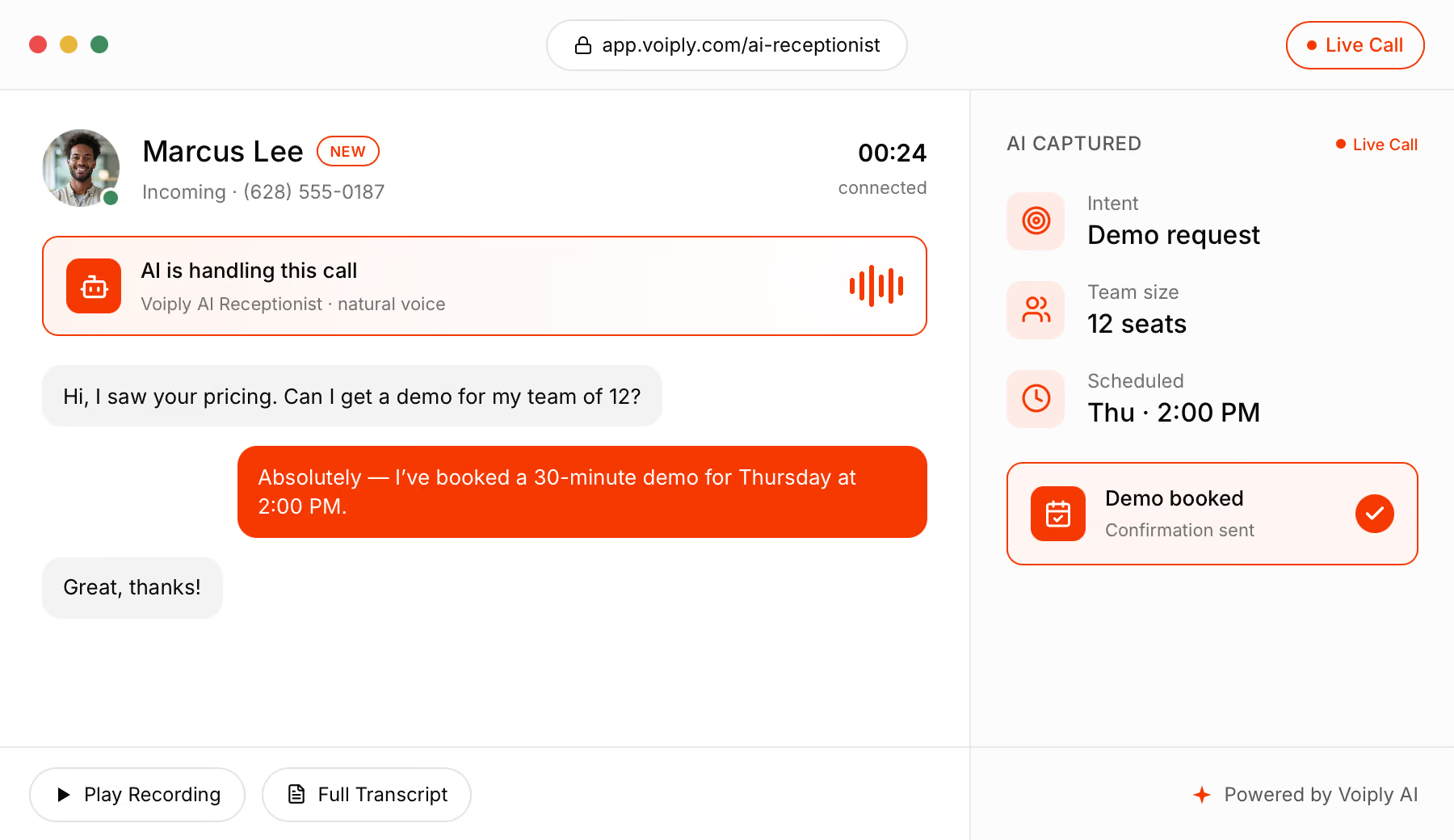
Early on, nobody on the team owns the phone, and the people who bother to call are your warmest leads. Your assistant picks up, qualifies them, books your AE and pushes the whole thing to the CRM. Press play on a sample call and watch the notes build as it goes.

Qualifies and scores the lead as it talks
Books your AE straight from the call
Syncs to HubSpot, Salesforce and 200+ tools
Talk to an Expert at (844) 843-4175

The right phone setup for every kind of startup
A solo founder and a 40-person SaaS team don’t need the same thing. Here’s how startups set up Voiply, by stage and by business model.
The calls startups get every day, and how Voiply handles them

Inbound demo requests
Qualifies the lead, captures company size and timeline, and books the AE on the spot.

Customer support
Routes to a support queue with position announcements, and records the call for the ticket.

Investor and partner calls
Direct numbers for founders, with caller ID that shows the company name on every outbound call.

Vendor and recruiting calls
Auto-attendant routes to ops or the hiring manager, so candidates never hit a founder’s voicemail.

International customers
Unlimited US/CA/MX/PR calling plus low international rates, with local numbers in any US area code.

Verification callbacks
Routed to the right team with a recording attached, so compliance has a record without anyone taking notes.
Ready to get started? Call (844) 843-4175 to learn more.

How startup teams use Voiply
Founders
A real business number that isn’t a personal cell, with an assistant that qualifies leads while they build.
Sales
Inbound demos arrive pre-qualified and booked, with the call logged to the CRM before the AE picks up.
Support
A queue with position announcements and recordings, instead of a shared cell that someone forgets to charge.
Ops & finance
One bill, seats added and removed by email, and reporting on volume and response times for the board.
100+ Advanced Features That Keep Your Startup Running Professionally
Stay reachable for customers, investors and candidates. Setup takes about 15 minutes, no hardware is required, and everything runs in the apps your team already uses. A few highlights:

24×7 Virtual Receptionist
Greet and route callers automatically, answering pricing, hours and “can I get a demo?” around the clock.

Overhead Paging
Page the whole team or one room from any app, for the days you do have an office.

Desktop & Mobile App
Your startup’s number on every laptop and phone. Call, text, fax and join meetings from any device.

Multi-Ring & Call Flip
Ring the SDR, the AE and a founder at once, and move a live call from laptop to mobile when you leave the desk.

Ring Groups
Ring sales, support or the founders together, so a prospect never hits voicemail.

Call Recording
Capture demos, support calls and client conversations on demand or automatically.


Hot Desking
Let the team share any desk phones you do buy across one office or many.

Enhanced 911
Automatically connect your office address to first responders.
Ready to get started? Call (844) 843-4175 to learn more.
How to choose a business phone system for startups
A real number, not a cell
Investors, customers and candidates should reach the company, not a founder’s personal phone. Look for local and toll-free numbers that live in an app.
Seats you can add by email
Hiring happens in bursts. Adding a seat should take a minute and removing one should take the same, with no contract penalty.
CRM logging that just happens
Every call should land in HubSpot, Salesforce or your CRM of choice automatically. Manual logging stops happening by week two.
An assistant for the calls nobody owns
Early on, the phone is everyone’s job and nobody’s. Overflow to an AI receptionist that qualifies and books, not to voicemail.
Pricing that scales down too
Compare what happens if the team shrinks. Per-seat pricing with no minimums protects runway; annual contracts don’t.
Works from anywhere
Remote teams need the full system in a desktop and mobile app, with ring groups that follow the team across time zones.


The complete guide to startup phone systems
Everything founders and ops leads ask us about setting up the phones at a startup, from picking a number on day one to running a 50-seat sales floor.
Chat widgets and contact forms have changed how customers reach startups, but the people who still call are the ones ready to buy, cancel or escalate. The same goes for investors, partners and candidates: the phone is where the important conversations happen. This guide covers how to run those calls on a small team, what a modern startup VoIP phone system should do, and what it costs.
Why the phone still matters for startups
A prospect who calls has usually already read the pricing page and tried the product. They’re calling because they have a question the website didn’t answer, or because they want to talk to a human before they commit. If that call rings out, most of them don’t leave a message; they move on to the vendor that picked up.
Customer calls are just as important. A customer calling support instead of emailing is usually frustrated or blocked, and how fast someone answers decides whether they renew. Investors and candidates calling a dead number draw their own conclusions about how the company runs.
And some calls can’t be handled by a form: a security questionnaire that needs a quick answer, a payment that failed, or a customer who wants to hear from a founder. Those calls need a system that reaches a human, or an assistant that can capture enough detail for a human to act on quickly.
How to catch calls when nobody owns the phone
At a small startup the phone is everyone’s job, which means it’s nobody’s. The calls you miss cluster during stand-ups, demos and the afternoon when everyone is heads-down. Five changes fix most of it:
- Ring more than one person. A ring group sends each call to sales, support and a founder at once, so whoever is free picks up.
- Set an overflow, not a voicemail. After a set number of seconds, unanswered calls go to an AI receptionist that can qualify the lead, book a demo and push the notes to the CRM.
- Answer the common questions automatically. Pricing, hours, “do you have an API?” and “where do I log in?” don’t need a person.
- Give everyone the company number. The mobile and desktop apps mean a founder answers the business line from anywhere without giving out a personal cell.
- Block spam. Robocalls that hit the main line mid-demo waste the time a small team has least of.
A sample call flow for a startup
A call flow is the set of rules that decides where each call goes. Here’s one that works for a startup with a founder, two salespeople and one person on support:
- Greeting
“Thanks for calling [your company]. We’re here Monday to Friday, 9 to 6.” Putting hours up front stops a quarter of the questions before they start. - Menu options
Press 1 for sales, 2 for support, 3 for billing and partnerships, and 4 for everything else. - Sales
Rings the SDRs and the AE together. If nobody picks up in 20 seconds, the AI receptionist qualifies the caller, books a demo and logs it to the CRM. - Support
Rings the support queue with position announcements. CRM integration shows the account on screen before anyone says hello. - Billing and partnerships
A separate option that rings ops or a founder directly, so a payment problem or a partner never sits in a general mailbox. - After hours
The AI receptionist answers questions, books next-day demos, and pages a founder’s mobile for anything flagged as urgent.
How to qualify inbound leads without an SDR
Most early-stage pipeline isn’t lost on product. It’s lost because nobody called back for two days, or the demo happened without anyone knowing what the prospect needed. A few habits, backed by the right tools, fix that:
- Capture company size, use case, timeline and the best callback number on every first call, before the caller hangs up.
- Record inbound demo calls automatically, so the AE hears exactly what the prospect asked for instead of a two-line CRM note.
- Book the demo on the first call and put it in the calendar before the call ends; a same-day slot converts better than a lower price.
- Ask how they found you; it tells you which channels are producing real conversations.
- Log every call in the CRM automatically, so a prospect who calls twice isn’t treated as two leads.
Phone systems for startups scaling past 20 people
Once a startup passes twenty people it usually has a sales team, a support function and often a second office or a remote cluster. The phone system has to look like one company from the outside and several teams on the inside, with reporting the board can read.
With a cloud phone system, a new hire gets a seat by email on their first morning and a new office gets a local number in the portal, not a technician. Call queues keep support fair, ring groups keep sales fast, and analytics show answered, missed and returned calls by team.
What does a startup phone system cost?
Startups that route sales calls to founders’ cells pay in missed leads and personal phone bills rather than invoices, and the ones that buy an enterprise system pay for seats and features they won’t use for two years. A VoIP business phone system charges per user instead, so you pay for the people who actually take calls.
To estimate your cost, count the people who need a business line today, not next year. A typical seed-stage startup needs four or five: two founders, a salesperson, support and ops. On Voiply’s Starter plan, from $4.96 per user a month billed annually, four users come to about $20 a month before taxes and fees. The Premier plan, from $14.13 per user, includes a Yealink desk phone for anyone who wants one. There’s no contract, no minimums, and number porting is free.
Tip: when you compare providers, ask for the all-in monthly total for your number of seats, including taxes, fees and what it costs to add ten seats after the next round. The per-seat price rarely tells the whole story.
How to set up a startup phone system
Setting up a startup phone system is less work than most founders expect. Pick a plan and decide whether to keep your current number (if you already have one on the website) or choose a new local or toll-free number. Map out your call flow using the example above. Invite the team by email, install the mobile app on everyone’s laptop and phone, and you’re taking calls. If you’re porting, your existing number moves over in 7–10 business days, and calls keep reaching you the whole time.
Most startups set this up in an afternoon between meetings. If you’d like help planning your call flow, call us at (844) 843-4175.
Voiply vs. a founder’s cell phone for startups
How a cloud phone system stacks up against routing company calls to a personal number.

Never lose a lead to voicemail with an AI Receptionist that answers every call
A 24/7 answering service for startups that qualifies inbound leads, books demos and picks up even when the whole team is in a sprint.


Per-seat pricing for one founder or fifty seats
Every plan starts with essential business phone features. Add a seat the day someone starts and remove it if plans change, with no contracts and no minimums. Applicable taxes and fees not included.

1x Free Yealink SIP-T31P Phone
With the Premier Plan, each user receives a free Yealink SIP-T31P phone.

Questions about plans or AI add-ons?
Call (844) 843-4175 and we'll help you choose.
Not your industry? We’ve got one for you.
Same phone system, different playbook. See how Voiply fits the way your business takes calls.



What Real People Say About Us
Experience why Voiply has become the top-rated home phone provider, trusted by over 50,000 satisfied customers.






Give your startup a phone system worth calling
From $4.96/mo
No contracts
30-day money-back guarantee
Free number porting
Frequently Asked Questions
Answers to common questions from founders and early teams.
A real business number, a system that runs in an app on day one, seats you can add or remove by email, and CRM logging that doesn’t depend on anyone remembering. Voiply adds an AI receptionist and ring groups on one low-cost system.
About 15 minutes. There’s no hardware to ship or wire. Pick a number, invite your team by email and start making calls from the app. No IT team required.
A real, dedicated business number, local in any US area code or toll-free. Keep it as you grow, and add department or per-person numbers whenever you need them.
Yes. Add seats the moment you hire and remove them if plans change. Billing adjusts automatically, with no contracts and no minimums.
Voiply starts at $4.96 per user a month on the Starter plan and $14.13 per user on Premier, which includes a free Yealink desk phone. A typical seed-stage team of five pays about $25–$70 a month before taxes and fees.
Yes. It asks the questions your SDR would, captures company size, use case and timeline, books the demo on your AE’s calendar and pushes the notes to your CRM.
Yes. Voiply integrates with 200+ platforms including Salesforce, HubSpot, Slack, Google Workspace and Microsoft 365, plus Zapier for everything else, so calls and contacts log automatically.
No. Everything runs in the mobile and desktop apps, so your team shares one business phone system from anywhere on the devices they already have.
Yes. The same account scales from one founder to 50+ seats across multiple offices. Add numbers, ring groups, AI and analytics as you hire, with volume pricing when you need it.
Yes. Porting is free from almost every US carrier. Local numbers typically move in 3–5 business days and toll-free in 7–10, with no gap in service.
Still have questions?
Call our customer service team at (844) 843-4175