
Running a small business means every hour spent on administrative work is an hour not spent on customers, sales, or the work your business actually exists to do.
Most phone-related frustrations in small businesses aren't caused by bad equipment or poor service. They're caused by systems that require constant manual attention for tasks a modern setup should handle automatically. VoIP (Voice over Internet Protocol) phone services for small businesses take these tasks off your plate entirely or reduce them to a few clicks, so your phone system runs quietly in the background instead of generating its own to-do list.
Here are seven phone system tasks that shouldn't still be on your list.
1. Updating Voicemail Greetings After Every Change
When your business hours shift, a staff member takes over a new role, or a holiday comes up, your voicemail greeting needs to reflect the change. In many small businesses, this means physically picking up the phone, navigating a recording menu, and re-recording a greeting by hand. Do it once, and it's a minor inconvenience. Do it eight or ten times over the course of a year, and it becomes a recurring task that quietly eats into your time.
A well-configured phone system lets you manage greetings through a dashboard or mobile app. You record once, upload, and schedule when each greeting plays. You can have different greetings for different hours, days, or lines, and the system can handle them automatically.
The change takes effect when you set it to, not when you remember to re-record. That's a meaningful difference during a busy week.
2. Rerouting Calls When Someone is Out
When a staff member calls in sick, takes a scheduled day off, or travels for work, calls that normally route to their line still need to land somewhere useful. The manual version of this is scrambling to update forwarding settings, calling your provider, or asking a colleague to cover a phone that isn't theirs.
A phone system that lets you adjust call routing directly from your account solves this in under a minute. You change where calls go, and the update takes effect immediately. When the person returns, you change it back.
You can also configure temporary forwarding rules in advance when someone plans to be out. Calls reach the right person, customers don't notice a disruption, and you didn't spend half your morning arranging coverage.
3. Adding Lines When You Hire
Growing your team means your phone system needs to grow with you. With some phone setups, adding a line means calling your provider, waiting for hardware to arrive, and walking through a configuration process with a support representative before anyone can pick up that phone and use it.
With a modern VoIP phone service for small businesses, adding a line is handled through your account. You add a user, assign an extension, and configure basic settings from your dashboard. In many cases, hardware can ship pre-configured, so the new hire can plug in and be up and running without any additional setup on your end.
4. Tracking Down Voicemails Across the Team
A voicemail left for your main line shouldn't sit unheard because the one person who checks that phone was out on a job or handling a customer. In small businesses with shared lines, messages fall through the cracks when there's no reliable way to route or distribute them.
Voicemail-to-email delivery directly addresses this problem. Messages get forwarded as audio files to the email inbox of whoever is responsible for that line. You can also configure shared delivery so more than one person receives the notification at the same time.
With this simple setup, the message gets heard, and the follow-up happens. None of it depends on someone remembering to check a specific handset at a specific time.
5. Releasing and Reassigning Numbers When Staff Change
When a team member leaves, their business phone number should stay with the business. In some setups, that number is tied to the employee's device or account, creating complications when they're gone. Tracking down the number, porting it back, and reassigning it becomes its own small project that lands on your plate at an already busy moment.
A well-organized business phone service keeps numbers tied to the business account rather than to individual employees. When someone leaves, you reassign the number through your account. When a new person takes over that role, they're up and running on the same line. Customers and contacts who call that number reach the right person without any outward sign of a staffing change.
The same applies when someone moves into a different role. The number stays with the position, keeping continuity and preserving existing workflows.
6. Setting Up After-Hours Call Handling
When your business closes for the day, incoming calls still need somewhere to go. Without a clear after-hours plan, those calls ring out or hit a generic voicemail greeting that may not reflect your current hours, staffing, or the options available to the caller.
Getting after-hours handling right manually can mean navigating a phone menu system, calling provider support to set time-based rules, or using a workaround that doesn't quite meet your needs. A modern VoIP system lets you define business hours through your account settings, create a dedicated after-hours greeting, and route calls to voicemail or an answering line, depending on what works for your business.
Once you set it up, the system automatically switches at closing time every day. You don't have to remember to forward calls before leaving. The routing handles itself.
7. Reconfiguring Call Flow During Busy Periods
Lunchtime, a seasonal rush, or a day when several team members are unavailable can overload a call routing setup, even if it works well under normal conditions. When calls pile up faster than people can answer them, the result is voicemails left without follow-up, missed opportunities, and a backlog that takes hours to clear.
Modern phone systems let you set up ring groups, call queues, and overflow routing before you need them. You define who receives calls in what order, what happens when no one answers within a set number of rings, and where calls go when all lines are busy. These settings remain in place and activate automatically when the appropriate conditions are met.
Setting up a call routing plan once is far less work than manually managing a rush in the moment. The system does the distribution. You focus on the calls that need your attention.
The Right Small Business Phone Services Reduce Admin Tasks
The seven tasks above share common threads: they take time, require attention on short notice, and don't directly contribute to what your business exists to do. Each one is a small drain on its own. Together, across a year, they add up to a real chunk of operational overhead.
Phone services that are built for how small teams work take these tasks off your plate. Routing rules, voicemail delivery, extension management, and after-hours handling are all configured once in an account dashboard and revisited only when your needs change. The system runs in the background, so you can manage your business instead of your phone system.
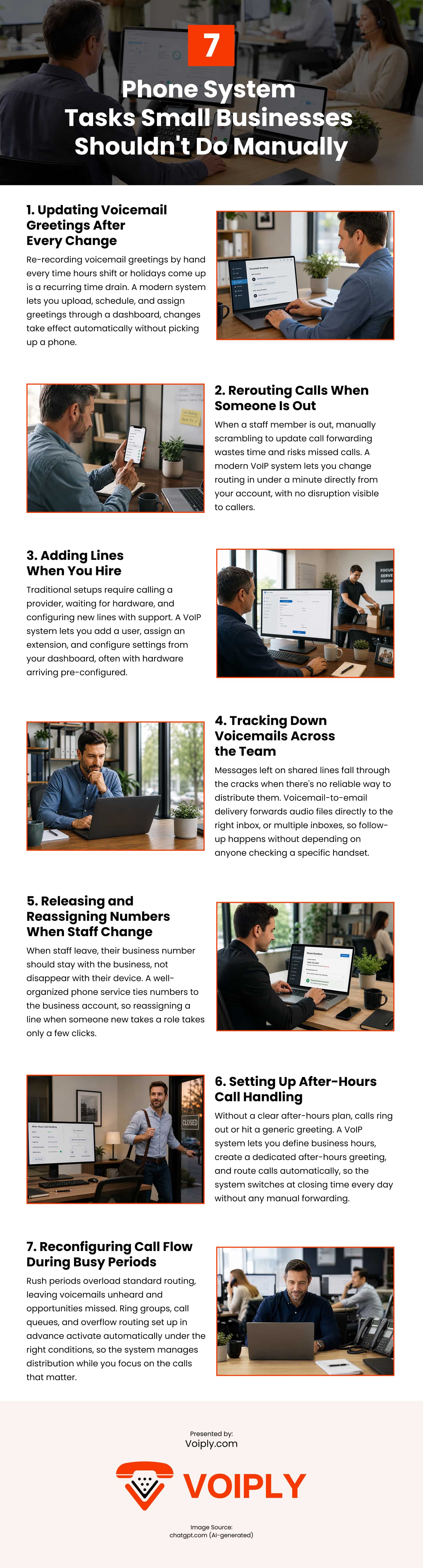
Infographic
Most phone-related frustrations in small businesses aren't caused by bad equipment; they're caused by systems that require constant manual attention for tasks a modern setup should handle automatically. Discover phone system tasks small businesses shouldn't do manually in this infographic.
Video
MONEY BACK GUARANTEE

SMS to Email
Announcements
Voicemail to Email
Call Forwarding
Toll Free / Vanity Number
or call (844) 843-4175
MONEY BACK GUARANTEE
Free Desk Phone
Desktop & Mobile Apps
Local and Toll Free Numbers
Voicemail to Email
Text Messaging
Unlimited Calling
or call (844) 843-4174
MONEY BACK GUARANTEE

No Apps. No Texts. No Distractions.
No Strangers Allowed
Quiet Time Protected
Unlimited Calling
Emergency-Ready
or call (844) 843-4175
MONEY BACK GUARANTEE

Unlimited phone service
Keep your existing number
Free adapter & free shipping
No contracts/setup fees
Use existing analog phone
or call (844) 843-4175
MONEY BACK GUARANTEE


Unlimited Phone Service
Keep Your Existing Number
Free Adapter, Free Shipping
No Contracts/Setup Fees
Use Existing Analog Phone
or call (844) 843-4175
MONEY BACK GUARANTEE
Desktop and Mobile App
Email To Fax
Dedicated Fax Number
Easily Fax Documents
No Contracts/Setup Fees
or call (844) 843-4175
MONEY BACK GUARANTEE

Flexible Plans
Everywhere Connectivity
High-Speed Internet on the Go
Reliable Internet Connection
Easy Setup and Access
or call (844) 843-4175